Cut to ship.
The PM capped the MVP at the consolidation work and punted the AI chatbot — the wishlist’s most ambitious item — to V2+, saving roughly six weeks of engineering. Owning that boundary as a team meant nobody renegotiated it later.
8 min read·30-second summary below
Redefining the emerging vulnerabilities workflow for security teams who measure response in seconds.
In short.
The problem
For an enterprise security platform, trust isn’t a feature — it’s the whole product. The vulnerabilities workflow had quietly lost that trust. Analysts had stopped doing primary investigation on the platform. They were researching new CVEs in NIST, vendor advisories, and Slack threads with colleagues, then coming back to the platform only to verify whether anything in their portfolio matched.
The screen they relied on most was the one they trusted least.
The actual security analysis — the part the customer was paying for — was happening in tools the platform couldn’t see. Customer Success Managers were absorbing the gap with apologies on every renewal call. One enterprise client had paused renewal conversations entirely.
The question wasn’t whether the workflow had problems. It was whether customers had any reason to renew a tool that wasn’t where their work was happening.
How the problem surfaced
80% of user-reported issues were tied to inability to quickly find or act on specific vulnerabilities.”
Support log analysis · Pre-redesignOne workflow was generating 80% of all support tickets. Concentration that extreme doesn’t get fixed by escalating to support — it gets fixed by reopening the design.
Only 20% of clients touched it in any given week. The other 80% had quietly stopped — no tickets, no calls. Light usage wasn’t an unused feature. It was the silent exit.
CSMs were the channel for how the workflow was actually being received. One put it bluntly: “Half my renewal calls open with someone telling me their analysts have given up on it.” They were reporting an active drain on the relationship.
User research
I ran a workshop with the Customer Success team — the people in daily contact with the analysts — and walked through a critical-CVE morning from each persona’s point of view. The goal was to ground every design decision in real behavior under real time pressure, not in what the team assumed analysts would do.
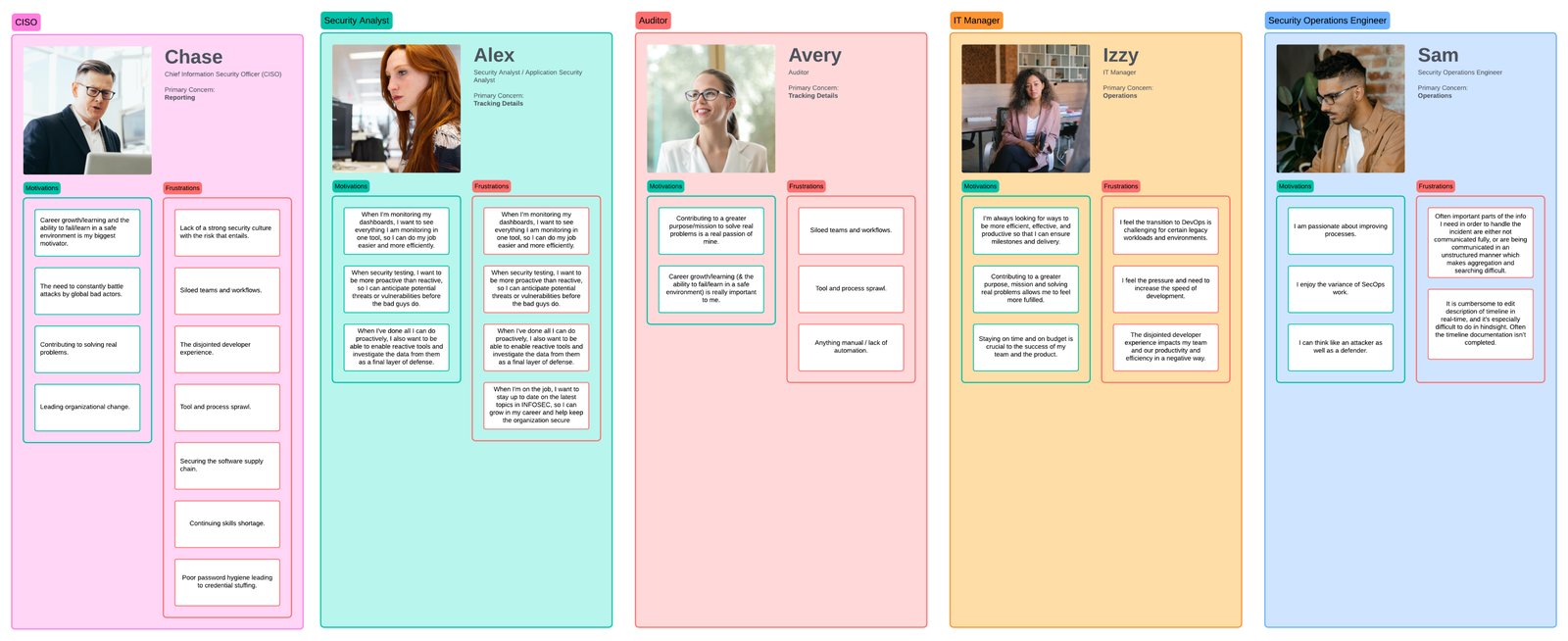
Workshop board — five personas walked through a critical-CVE morning; sticky-note pain points clustered per persona. Redact client and colleague names before export.
Each persona arrived at the workflow with a different first question. The page had to answer all of them within seconds of being opened.
Tell me what I need to brief the board on — and what’s already under control.
Just show me what’s exposed and what to do. In that order.
Show me the timeline. I’m going to need to defend this in 90 days.
How does this slot into the sprint? What stays, what drops, who has bandwidth?
Walk me through the response. What’s running, what’s broken, what do I touch first.
Analysts verified every CVE elsewhere first — NIST, vendor advisories, a Slack ping. The portal was where they came to record work, not start it.
Search was so unreliable analysts gave up — paging the table by hand, scroll, click next, until they hit the right CVE. The workaround had become the workflow.
CISO, SOC analyst, auditor, IT manager — different titles, different goals. But in a breaking-CVE scenario, every persona's first move was the same: is this affecting us right now?
Each of the three insights pointed at the same set of fixes — make search trustworthy, give analysts a path to action. The team voted on every feature, but the vote alone wasn’t the brief. We plotted every feature on impact and effort, and the brief picked itself.
The big cut
AI had the loudest energy, but search had the clearest path to delivery.
The chatbot scored highest on impact — the most votes of any feature. It still went to V2+ because its position on the cost axis put it outside what the insights would justify: six weeks of engineering and three new dependencies.
Eight features clustered in the MVP zone — high impact, low effort. Three sat on the deferred side. The matrix made the brief inevitable.
Rapid prototyping
Polished mocks pull the conversation toward styling. Sketches kept it on workflow.
The workshop didn’t end when the whiteboards filled. I kept sketching in the room with the CSMs — the people who’d field the tickets if it shipped wrong. Low‑fidelity on purpose: they’ll critique a scribble but defer to a polished mock. It compressed the feedback loop from sprints to minutes.
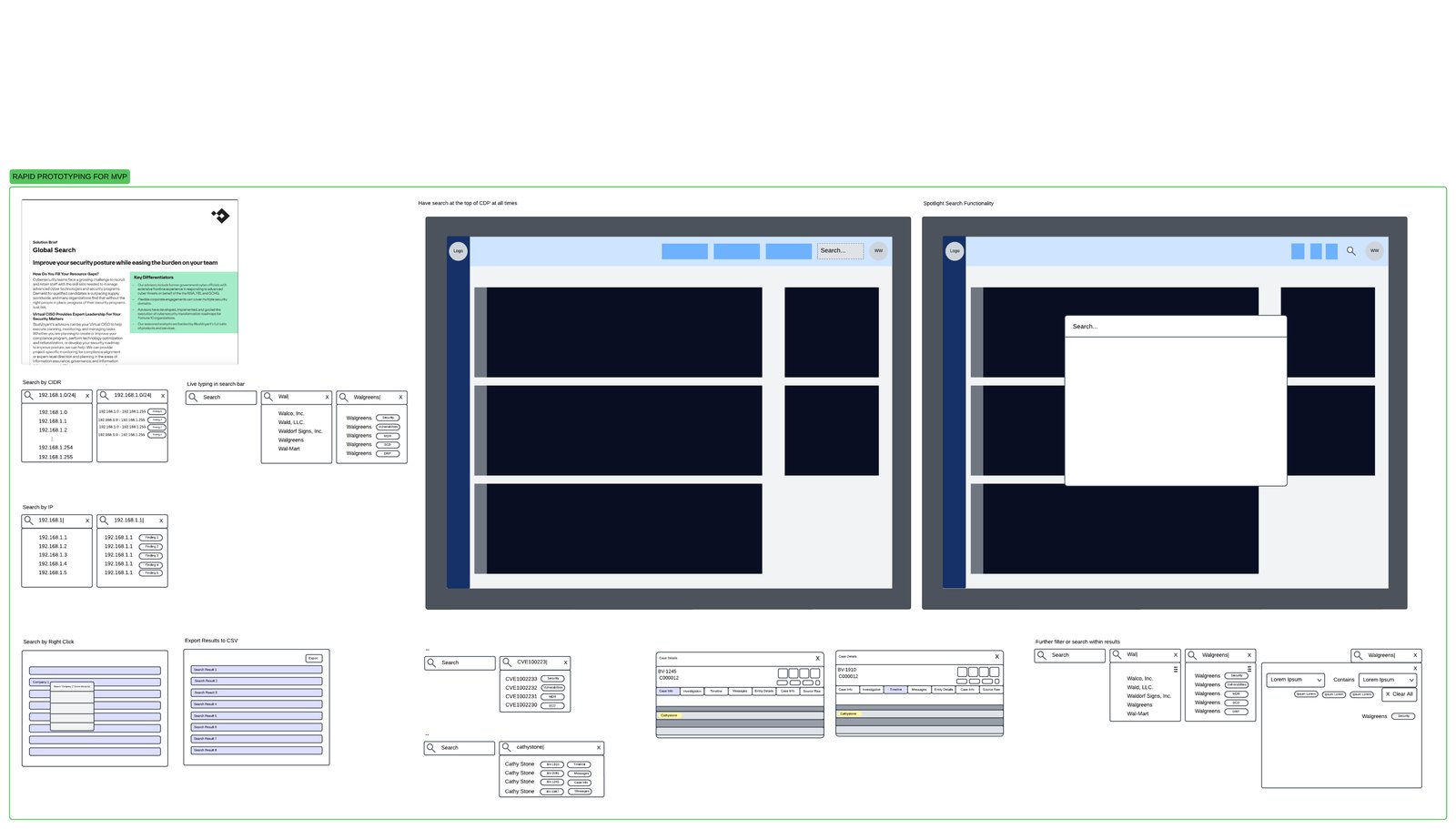
Rapid prototype wireframes — search-by-CIDR, search-by-IP, search-by-right-click, spotlight search, CSV export, hover tooltips.
Each one came from a CSM watching the sketch and saying “that’s not how they actually do it.”
Analysts type ranges by hand more than they paste them. A submit-on-enter pattern would’ve forced a round trip for every typo — obvious only after watching a CSM mime the keystrokes over a sketch.
CSMs kept describing how analysts opened the tool: not from the dashboard, but from wherever they were in the product, mid‑task. A persistent global search — reachable from any screen — matched that behavior. A homepage search bar would’ve forced a context switch on every lookup.
Design iterations
The cross-functional team became the iteration loop — Customer Success with a direct line to renewal calls, Product owning priority and scope, Design pushing craft from the inside. Each version below came out of a specific piece of feedback from one of them. Click any version to open it full size with the conversation that drove it.
From scattered table to glanceable timeline.
From dense record to clear next move.
Cross-functional collaboration
Three moments where collaboration changed what shipped.
The PM capped the MVP at the consolidation work and punted the AI chatbot — the wishlist’s most ambitious item — to V2+, saving roughly six weeks of engineering. Owning that boundary as a team meant nobody renegotiated it later.
The Overview widgets aggregate 26,000+ vulnerabilities on every render — computing that live would have added ~2 seconds to first paint. We moved to a rollup refreshed every 15 minutes: the widgets show the shape of the week, not the state of this minute — and for getting a feel before drilling in, that staleness was the right cost.
The design lead caught the hover-vs-click pattern at v2: drilling into a row for a read-only version check was a navigation cost analysts paid 20+ times a day. We pulled it to a hover — thousands of needless route changes saved before anything shipped.
It was messy, long, and exhausting. The AI chatbot didn’t ship. Most of the post-MVP wishlist didn’t either. We made the call to ship the core first and layer the rest in later. I’d make that call again.
The impact
Numbers from the first quarter post-launch. The slider below is supporting evidence — what mattered is what the dashboard did once it was in analysts’ hands.
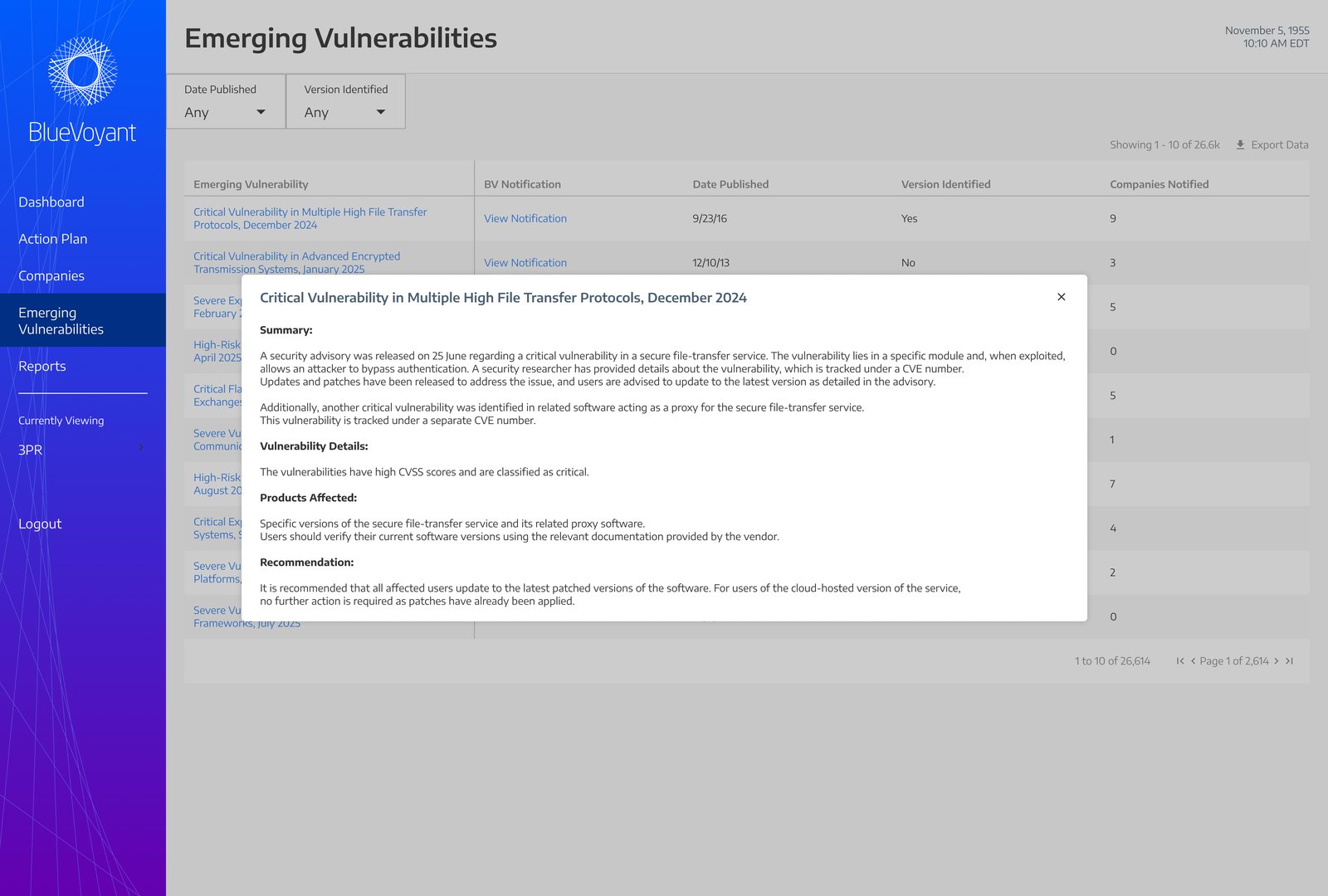
Before — the old vulnerabilities table with summary modal popup.
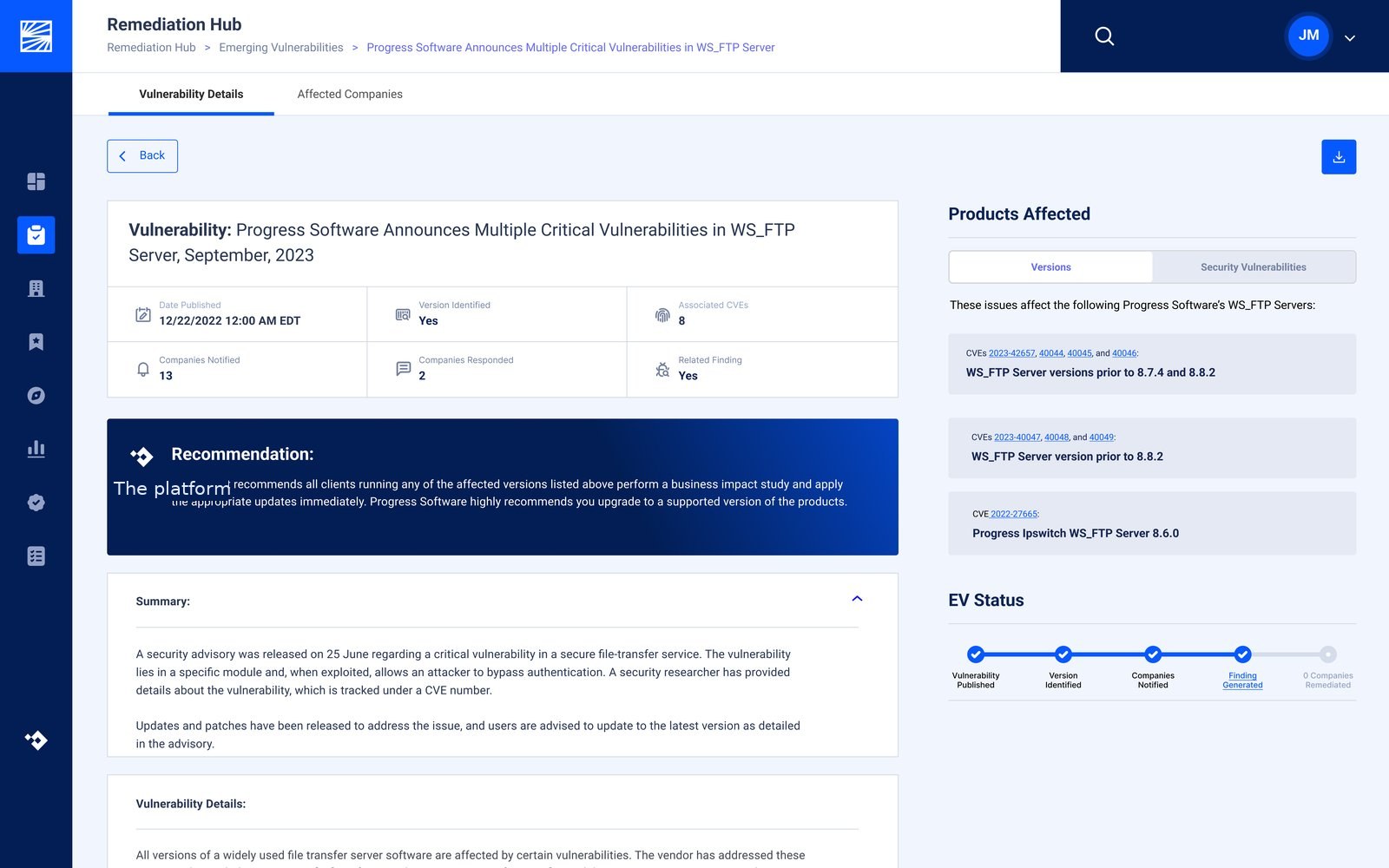
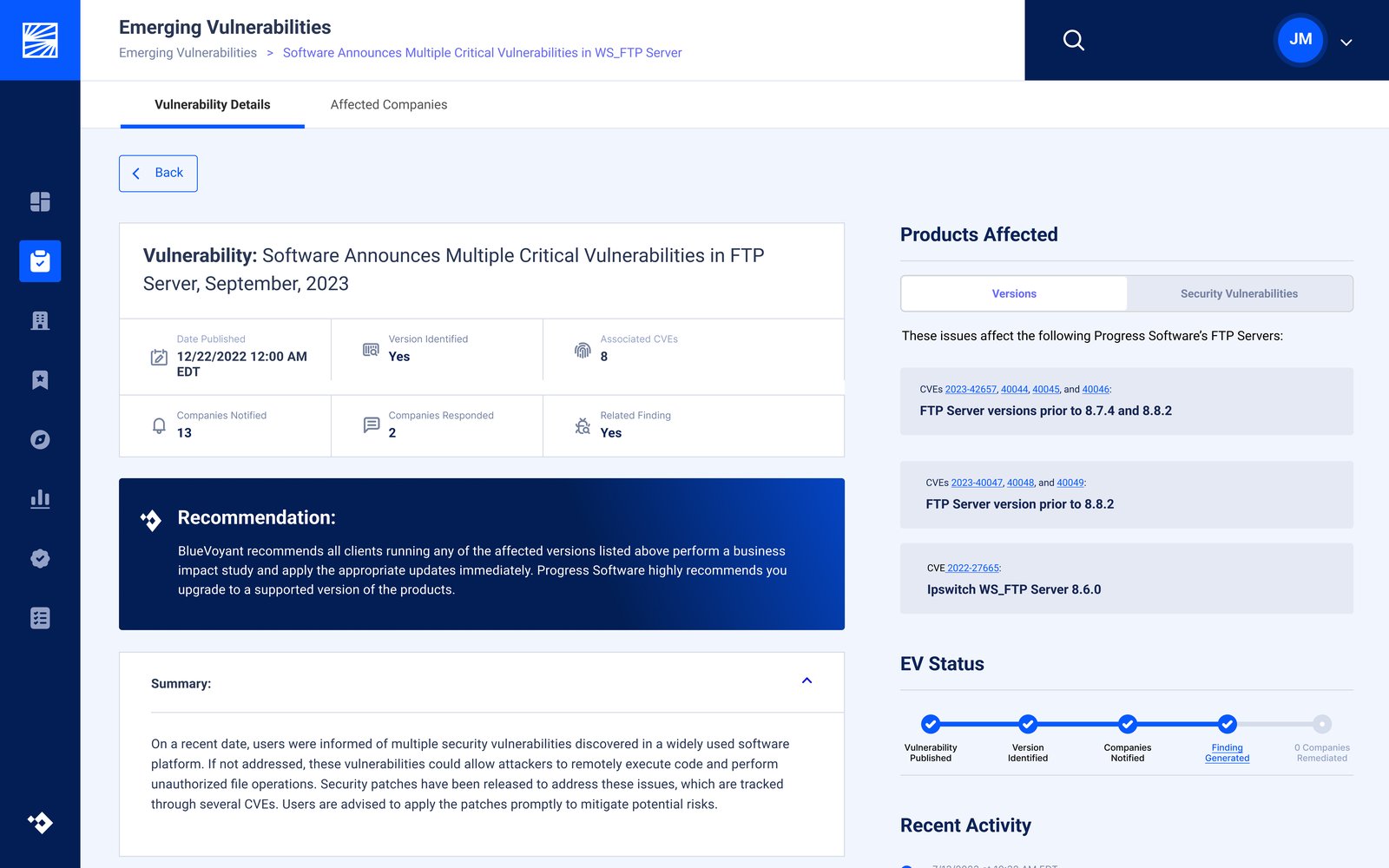
After — the new the detail page single-page details view with recommendation, summary, products affected, and EV status timeline.
Drag the handle, click anywhere on the image, or focus the handle and use arrow keys to swipe between the old and new design.
I went into the renewal call this quarter without an apology written into the agenda.
CSM lead · first renewal cycle post-launchStill on the v2 roadmap: everything the team is now building on top of the spine — the long tail of asks that didn’t fit the MVP window. The work continues.
Reflection
Once when the PM capped the MVP and we cut the AI chatbot to V2+ (saved six weeks of engineering). Again when stakeholders didn’t try to renegotiate the cut later. Owning the MVP boundary as a team is the cheapest political tool a designer has.
My early sketches treated vulnerability data as a database problem — sortable, filterable, searchable. The breakthrough was abandoning that frame and treating each vulnerability as a decision someone had to make under pressure. Once the Detail view became a decision page instead of a data view, every other layout problem got easier. I’d start there next time instead of arriving there in v3.
The CSMs already write a plain-language vulnerability summary for every Tuesday client call — by hand, every week. The first version of this block isn’t AI; it’s an editable text field the CSM team can populate together. The AI rewrite is v3.