Case 03 — Advisory fee billing platform · Enterprise UX

9 min read·30-second summary below

Billing,
untangled.

Redesigning the billing section of a financial-services SaaS — where advisors calculate, collect, and post their fees, and the corner of the product that had quietly become the messiest. And learning, three iterations in, that the first answer is rarely the right one.

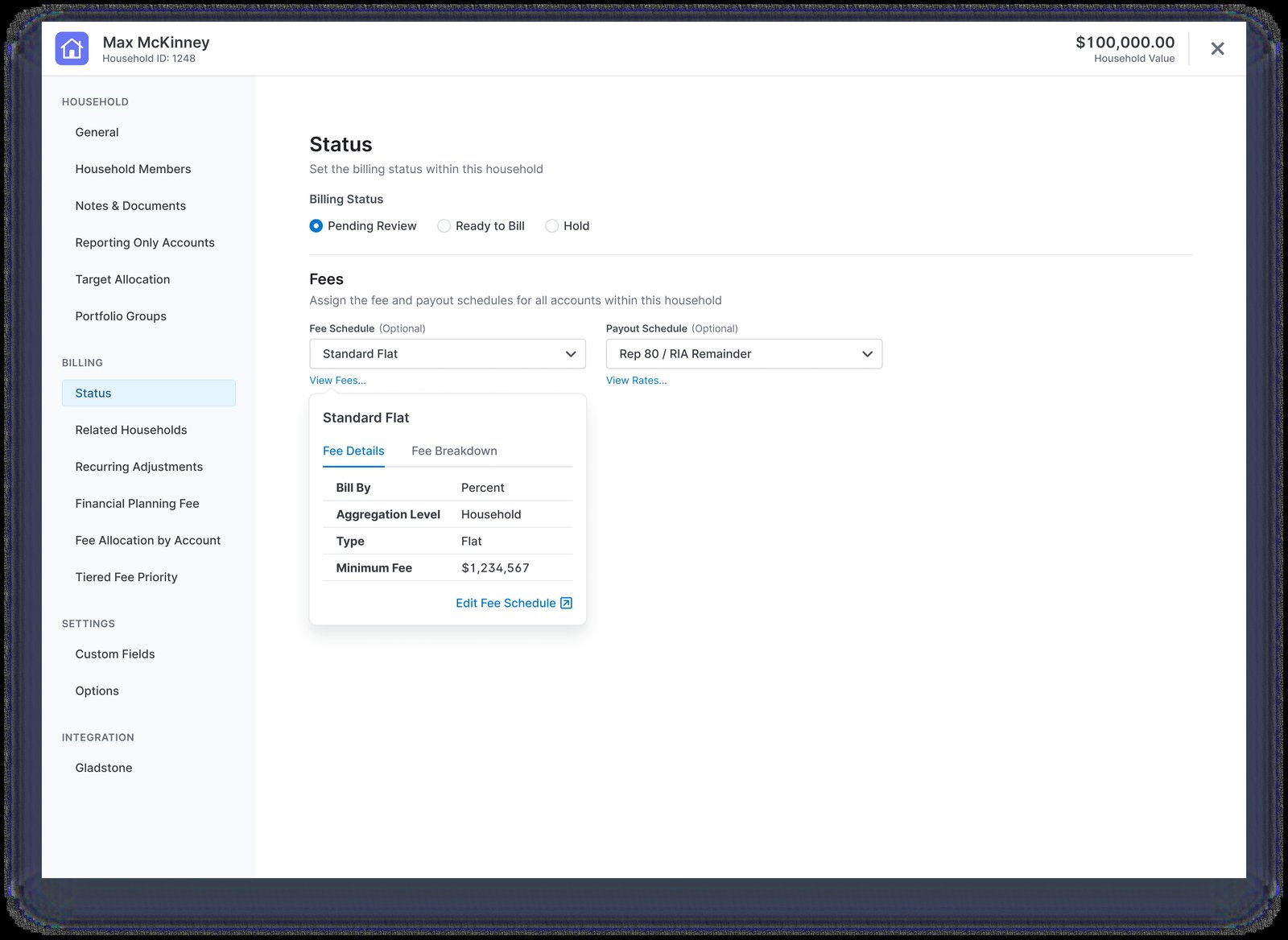
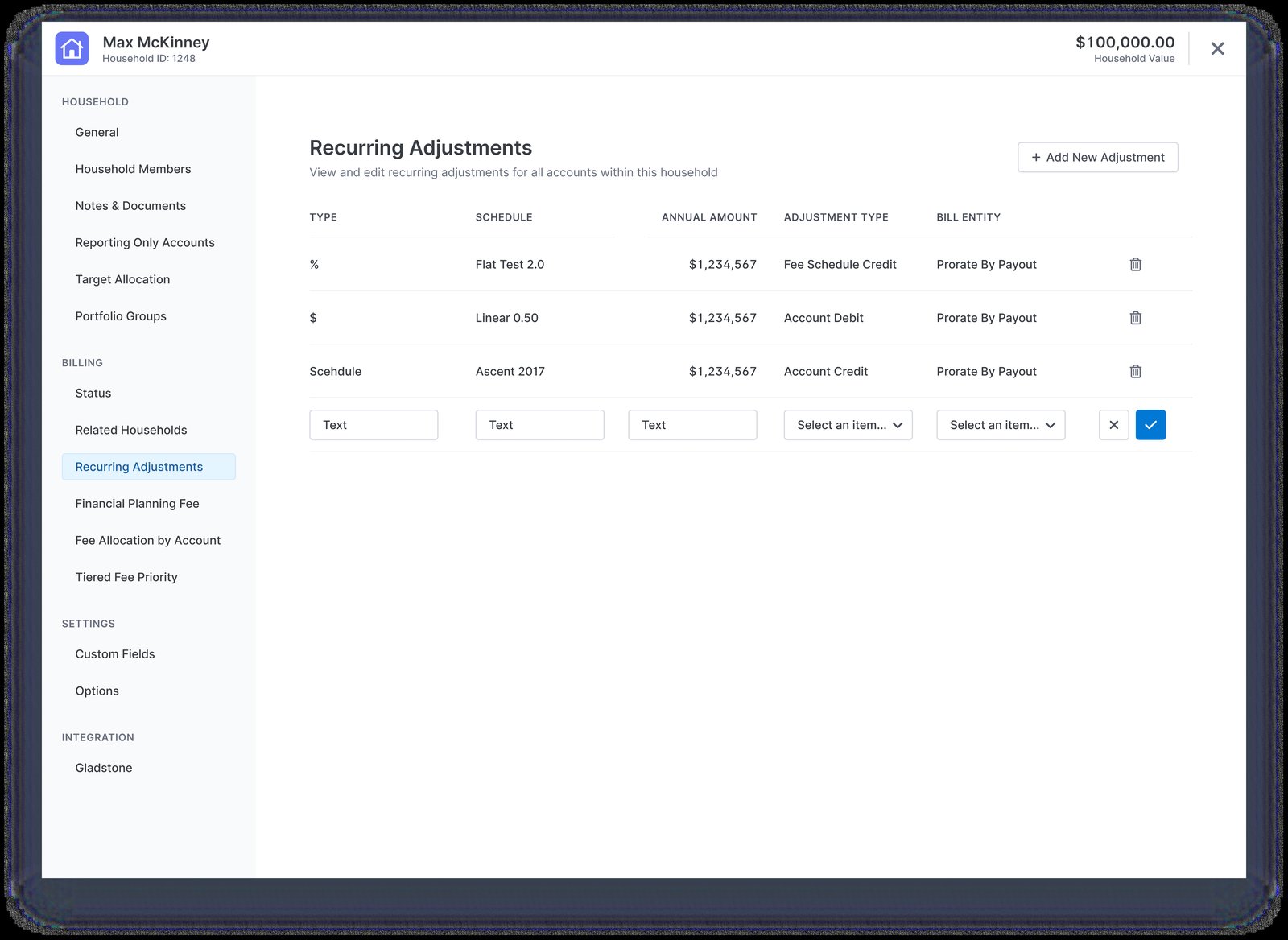
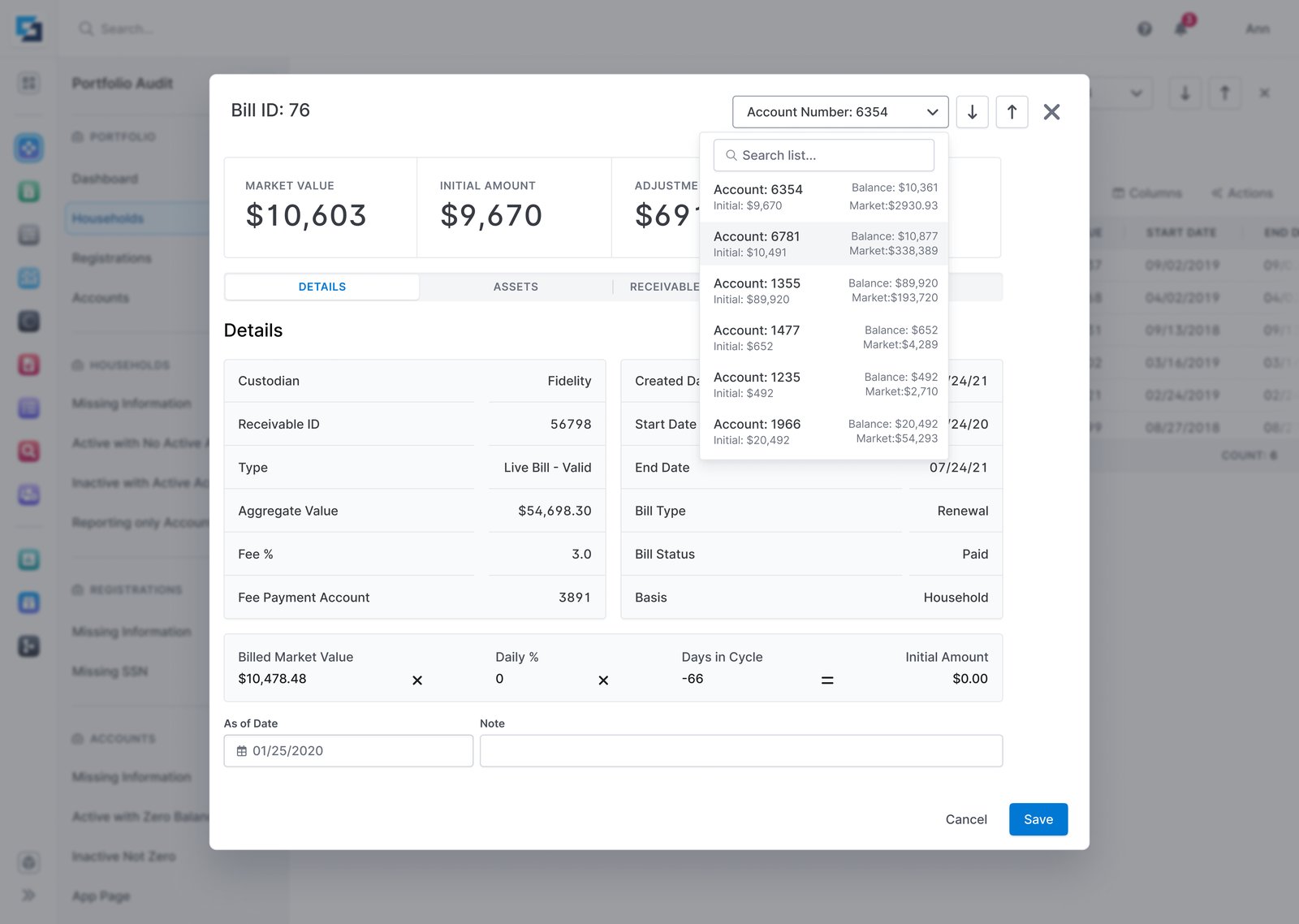
The redesigned billing — the Bill Instance view (market value, fees and the full receivable detail) front and centre, with the audit and settings screens receding behind it.

In short.

Domain
Enterprise financial-services SaaS used by advisors to manage their practice end-to-end. This case covers the billing section — the most tangled part of the product.
Scale
An IA audit of every page in the billing section — 33 in all, from live screens to deprecated and duplicate ones — then the two core surfaces, each rebuilt twice.
Role
Product designer on the billing team — owned research, UX, and interaction design for the consolidation.
Team
Fellow designers in regular critique, product managers, engineers, and the billing operations service manager.
Methodology
Mixed-methods research (analytics, NPS, support cases, interviews) → IA audit of every billing page → two parallel iteration arcs, three to four feedback loops each.
Constraints
Design system migration in flight. Three stakeholder cohorts — advisors, billing service team, product. Six-week window. NDA on client identity and customer data.
Outcomes
Cleaner interfaces, markedly less cognitive load — reviewing a fee schedule now happens in the workflow instead of the detour advisors routed around. Released to a pilot, then wider.
2
Distinct UX problems
tackled inside the billing section
4×
Design-feedback loops
per problem, on average
4
Research streams
analytics, NPS, support cases, interviews
6 wk
Design window
research through final designs

The problem

Inheriting the section nobody wanted to open.

The billing section had been built piece by piece over years. Every new fee type, every reporting requirement, every regulatory tweak got bolted onto screens already crowded by the round before it. None of it was unreasonable on its own. Together it had produced a part of the product that even the people who built it had quietly stopped using.

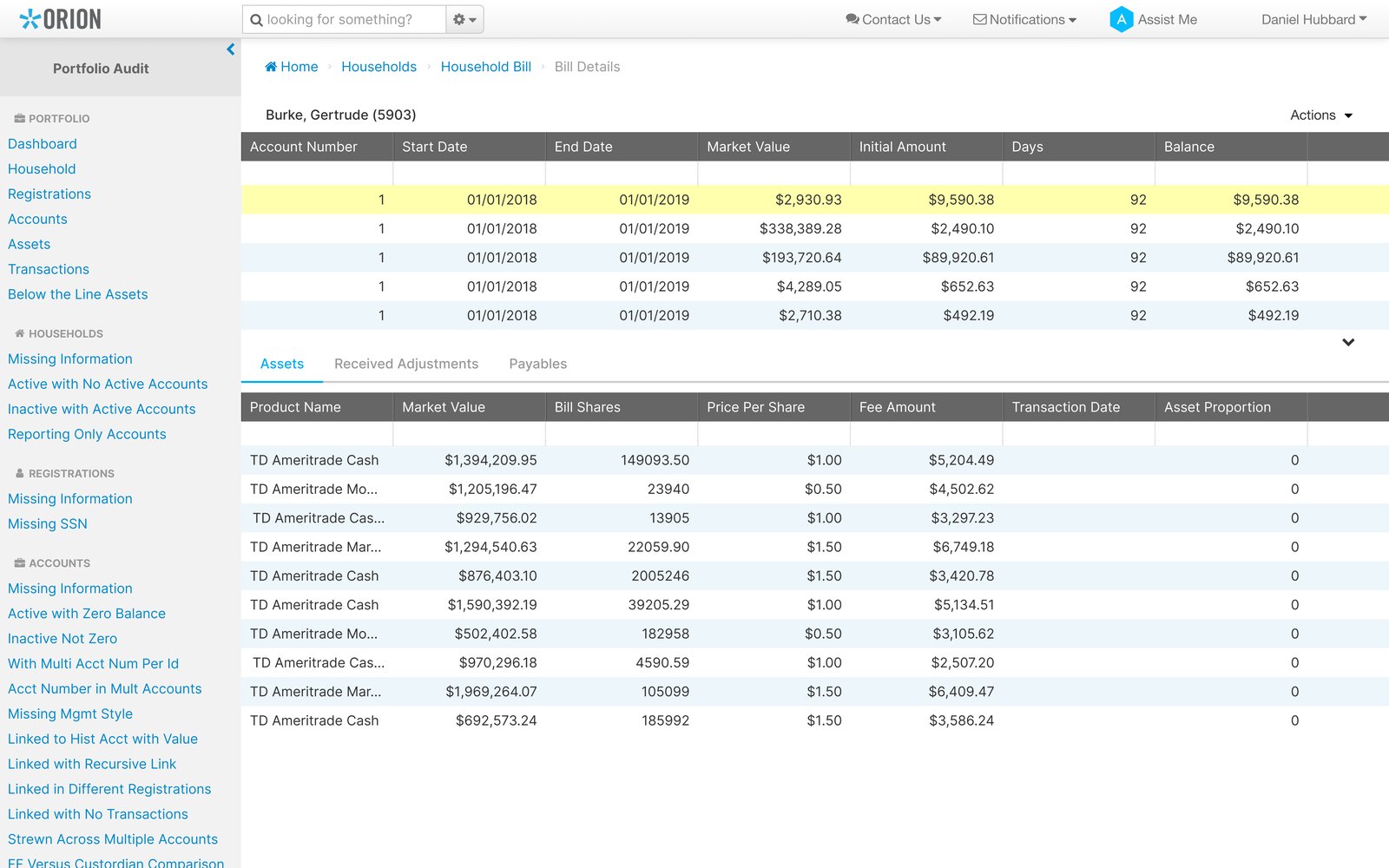
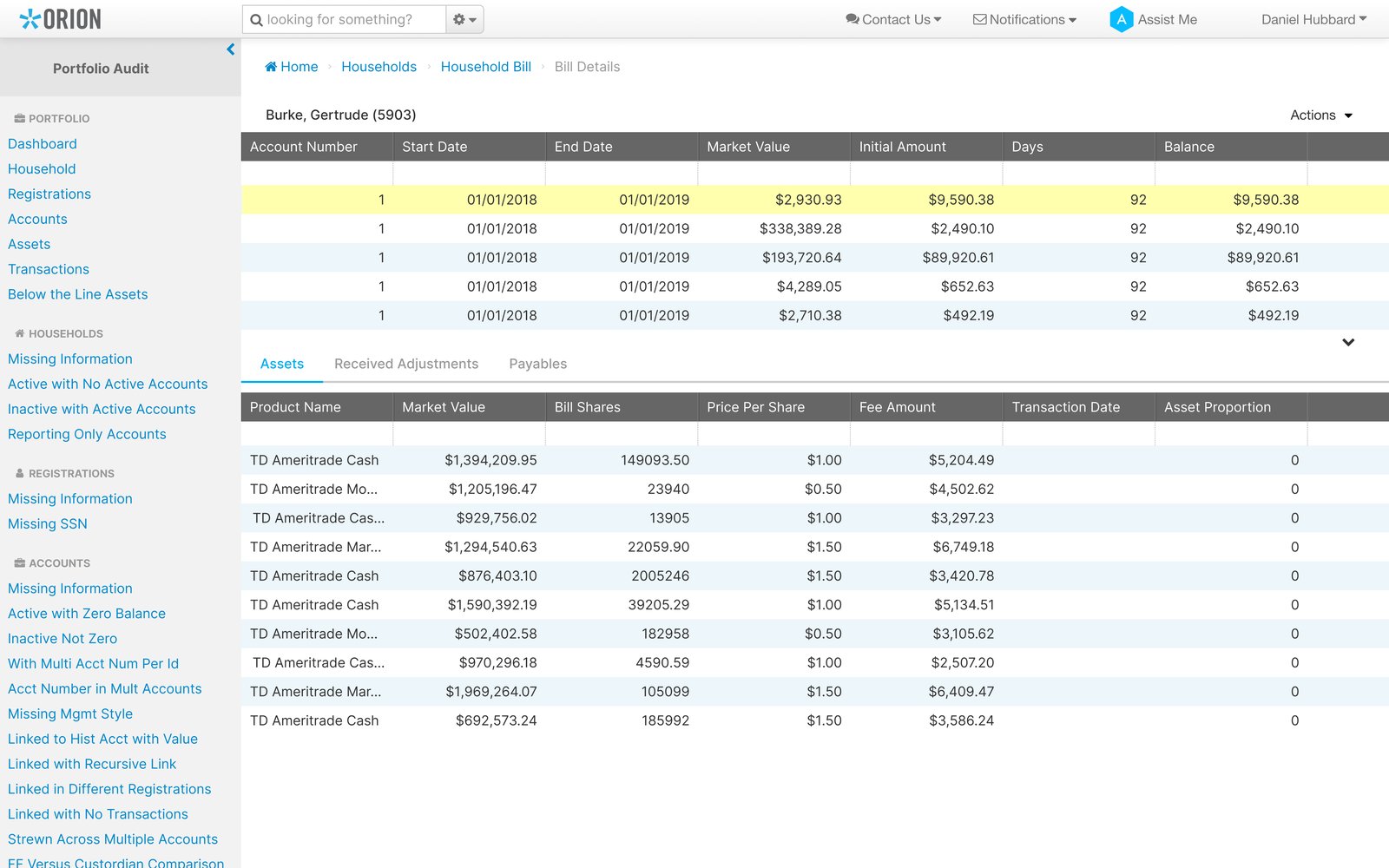
Current UI — Bill Details page pre-redesign. Two linked tables (bills above, assets for the selected bill below). Selecting a row in the top table silently updates the bottom one — but nothing on the page signals that relationship. Current UI — Bill Details page pre-redesign. Two linked tables (bills above, assets for the selected bill below). Selecting a row in the top table silently updates the bottom one — but nothing on the page signals that relationship.
  1. 01 Click a row and the whole lower half silently re-renders — nothing on the page connects them.
  2. 02 Both shown at the same visual weight — no master, no detail.
  3. 03 No cue telling users where to start on a page named for details that doesn’t show any.

My first instinct was to clean it up. That instinct lasted about ten days.

How the pattern surfaced

Four methods,
one signal.

Before designing anything, the question I needed to answer was a strategic one: is this a “fix the screens” job, or is it bigger than that? I held four research streams up against each other — usage analytics, NPS, support cases, user interviews — and asked what they had in common.

  1. Usage analytics

    Sessions getting longer. Workflows abandoned more often, not less.

  2. NPS

    Billing’s score trailing the rest of the product, quarter over quarter.

  3. Support cases

    The same handful of jobs, in the service queue every single day.

  4. Interviews

    Users describing a workflow they had built for themselves, outside the product.

All four said the same thing

Every signal pointed at the same thing: navigating billing was costing more than billing itself.

That changed the brief. We weren’t fixing screens any more — we were redesigning a section that users had quietly given up on.

Mapping the section

The map that made the cut.

Discovery told me it was section-level. So I put every page on one wall.

To redesign a section, you first have to see the section. I mapped every page in the billing area — current screens, deprecated screens, screens nobody opened, screens that did the same job three different ways — into one diagram. Once it was on one wall, the cuts were obvious.

Hover a page for detail · Click a cluster to expand · Click a verdict to filter

Merge

Pages doing the same job three different ways — collapsed into one.

Hide

Pages used only by the billing service team stopped surfacing in advisor navigation, but stayed accessible to ops.

Remove

Deprecated pages and orphaned utilities — no usage, no owners — deleted entirely.

Design iterations

Two deep dives. Each one solved twice.

Two problem areas inside the billing section, two iteration arcs, same shape every time: an honest first attempt, a critique session that exposed what wasn’t working, a second attempt that fixed the surface problem — and a final design that came only after I went back and un-asked the original question. Click any version to open it full size with the moment that drove the next change.

Bill Details

From two unlinked tables to a clear master-detail view.

Billing Audit

From whitespace, through clutter, to a balanced view with inline schedule previews.

Cross-functional collaboration

The work was design. The decisions were conversations.

Three conversations that changed what shipped.

01 Design critique

Asking the second question.

The first iteration looked clean — until a critique asked, “What’s the user going to do with twenty read-only inputs?” That reframed the whole arc, from design a form to design a view, and saved me from shipping a polished version of the wrong thing.
02 Billing service manager

What advisors don’t write in NPS.

Analytics and NPS gave shapes; the support queue gave specifics — “three advisors called this week because they couldn’t find the audit checkbox.” Advisors don’t file a survey to say “I clicked the wrong tab again,” so I treated that queue as its own research stream.

03 Product manager

What to ship, what to flag.

When the brief shifted from fix the screens to rebuild a section, the timeline didn’t. The PM and I made the call together: ship the two deep dives, flag the rest for next cycle — ship the spine, let the ribs follow.

None of those conversations were free — arguing in public, sitting with a raw queue, cutting good work for scope. All three changed what shipped.

The impact

The work shipped. The relief was specific.

Released to a pilot cohort, then rolled out wider after positive signal. The most useful feedback wasn’t a metric — it was the specific language advisors started using to describe what was different. Two outcomes, one per deep dive.

Detail visible.
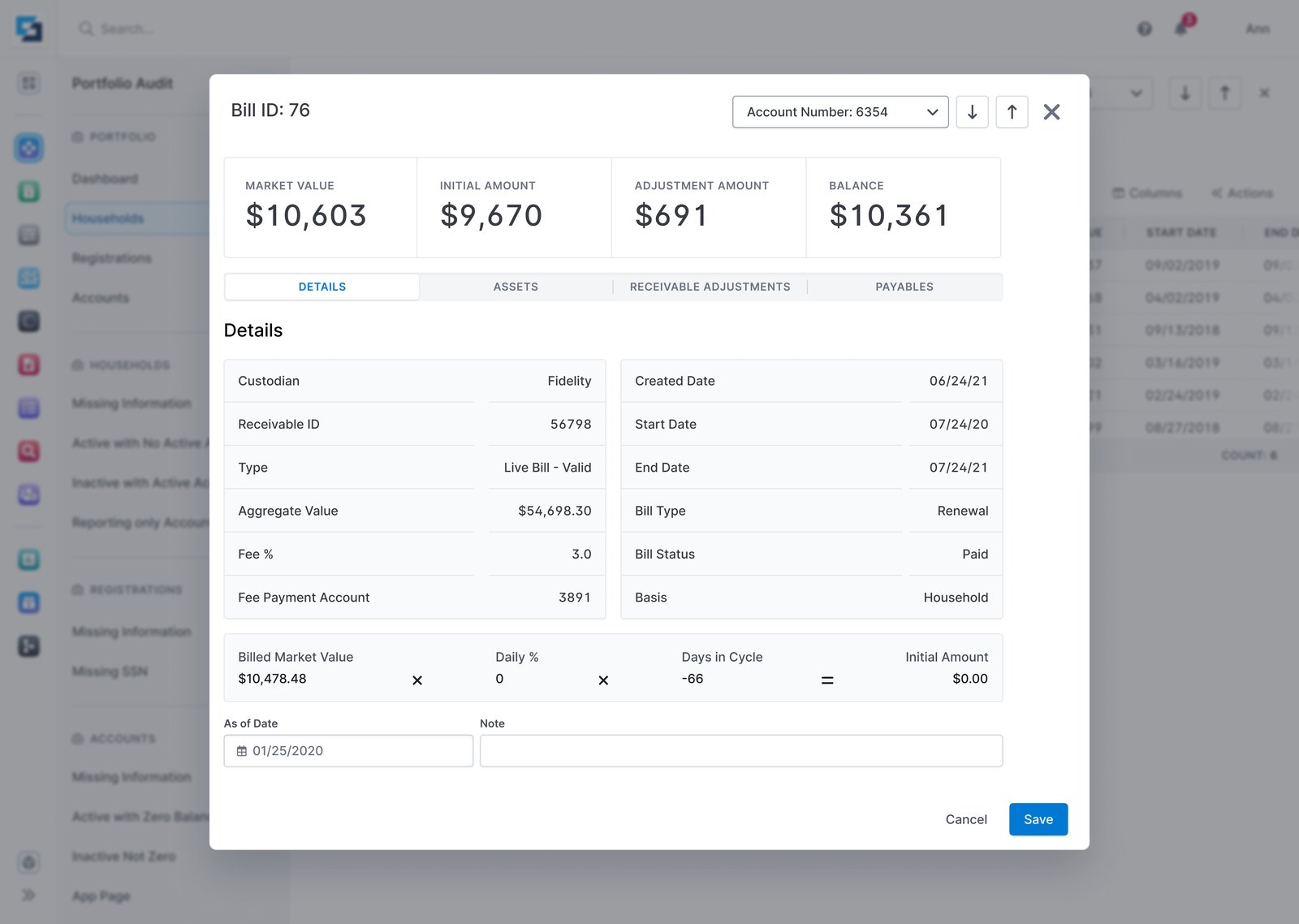
Bill Details — selecting a bill now reveals it
as cards, not as a form pretending to be one
Schedule inline.
Billing Audit — fee schedules preview in place
without leaving the workflow
Before — original Bill Details with two stacked tables; selecting a row silently updated the lower one. Before — original Bill Details with two stacked tables; selecting a row silently updated the lower one.
After — the redesigned Bill Details with the bill detail rendered as read-only cards plus search to jump between bills. After — the redesigned Bill Details with the bill detail rendered as read-only cards plus search to jump between bills.
Before
After

Drag the handle, click anywhere on the image, or focus the handle and use arrow keys to swipe between the old and new design.

I just looked at a fee schedule without leaving the page. That’s all I wanted.

Pilot advisor · first week post-release

Still ahead: the rest of the billing section, in the next release cycle. The two deep dives shipped as the spine — the patterns they established (master/detail, inline preview) carry into every screen still to redesign. The work continues.

Reflection

What I’d keep, change, and ship next.

Keep. The pattern

The second-look ritual is the safety net.

Both deep dives followed the same shape: attempt, critique, second attempt, then un-asking the original question. That last beat caught the disabled-fields mistake and the view-vs-edit conflation — without it I’d have shipped the wrong thing twice.

Change. The starting move

The brief is also a deliverable.

I spent week one treating the brief as fixed — but the screens were the symptom, the brief was the disease. Reframing from fix the screens to rebuild a section users had given up on cost a full cycle I’d later cut. Next time, the first deliverable is a re-framed brief.

Ship next. The scale-out

Two patterns, scaled to the rest of the section.

The deferred screens get the patterns the deep dives proved: master/detail for any view pretending to be a form, inline preview for any read job that shouldn’t cost a page change. Working templates now — no more three cycles to find them.

Vinay Peri · Product designer · 2026
Built by Vinay Peri, using Claude